
Burn DMG to bootable macOS Install DVD in Windows
DMG is a disk image format for Mac just like an ISO file in Windows. Therefore, it is possible to mount a DMG file on a virtual disk or write it to a DVD and access its contents. A macOS installation package with DMG extension enables creating bootable installer DVDs. My first experience with burning a DMG file to DVD was actually on Windows, back in 2013, when Mountain Lion was the operating system. I accidentally formatted the hard disk of my iMac and lost the recovery partition in the process. The only option left for me was buying an OS X Lion Installer disc as the Internet Recovery required a lot of bandwidth and time. Later, I found a way to burn macOS DMG file to a bootable DVD on my Windows laptop. Eventually, I restored my iMac to OS X 10.8 using the same DVD as macOS installation disc.
Steps to burn dmg file to bootable macOS DVD in Windows
Let’s start with the process of burning a Mac OS X installer in DMG format (InstallESD.DMG) to a DVD in a Windows environment. Here we use an old version of Mac OS, Mountain Lion, to make a bootable macOS DVD.
Since Apple has changed the file architecture of the macOS installer, this tutorial may be outdated if you plan it for the latest macOS versions. In that case, you need to download a special custom-made version of macOS DMG (bootable) from the Internet or get it converted from a macOS installer. However, from Step 4, the procedure is standard across all macOS variants from OS X Lion.
- Get macOS Installer in bootable DMG format.
- In the video we use OS X 10.8 Mountain Lion downloaded from the Mac app store. You could also find a copy from the Internet.
- Install the free Windows application 7-ZIP (download) to extract and locate InstallESD.DMG, which includes all files to form a bootable macOS DVD.
- Now, download and install TransMac version 12 (15-day trial) for Windows 10 from official website.
- Run Transmac app as administrator, by right-clicking on its icon.
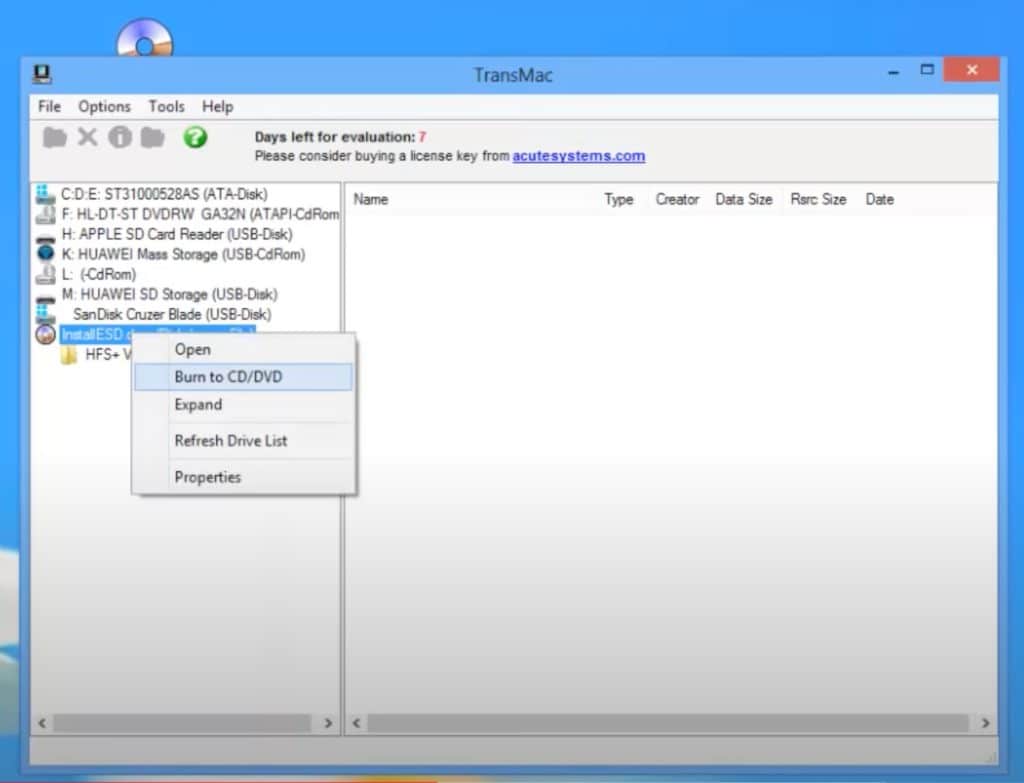
- Click on the File tab at the top, and select the option “Open Disk Image” to load macOS installer DMG file to the software.
- Find the DMG file loaded on the left side, right-click on it and choose to burn it to DVD.
- Once you write InstallESD.DMG file to DVD on Windows, load it to a Mac and start it.
- Press the Option key and select the listed DVD as your installation source.
The DMG files for new macOS versions are around 5.8 and 8 GB. You need a dual-layer (8.5 GB) DVD for a file of that size. Alternatively, if your Mac doesn’t have a DVD drive, you may consider buying a portable DVD writer or making a macOS USB in Windows using the same software.
Make a macOS install DVD in Windows PC from DMG/ISO image
As we mentioned earlier, Apple has changed the file architecture of the macOS installer from OS X Mavericks 10.9. Hence, you cannot follow the above-given technique to directly extract InstallESD.DMG in Windows and make it a bootable DVD in newer macOS variants like High Sierra and above. It may be possible to locate an InstallESD.DMG or Basesystem.DMG from the ‘Shared Support’ folder inside macOS installation package ending with .APP extension, but still, you cannot make it bootable for a USB or DVD. That simply means, the macOS DMG file you would get from Apple.com are not supported.
However, most people searching for methods to burn macOS DVD on Windows don’t have a Mac in a working state. A workaround for this problem is to create macOS bootable DMG file on Mac itself from the official macOS installer [Download macOS offline installer [DMG and APP ]. You could also get it done from your friend’s Mac or at a service centre and mail it to your Windows PC.
Watch the following video from 2.20 to create a macOS bootable DMG file. Then Transfer it a a Windows PC online or with the help of a USB disk.
Alternative options to burn DMG in Windows 10 without DVD drive.
If you have an old iMac or MacBook Pro with a DVD slot, you may use the above method to restore macOS through a bootable DVD installer created from a DMG source. However, as you know, none of the new Macs has an optical drive. Let’s check out a few alternatives.
- Format a USB Drive to GPT partition scheme in Windows. Next, restore the macOS Mojave or High Sierra DMG using Transmac.
- Get a portable DVD writer to boot into macOS installer.
External hard disks also work well for this requirement provided the file system is in the HFS+ format with GUID partition scheme.
Burn DMG to USB for new macOS versions
Looking for a way to burn the DMG files and create new MacOS Installer on your Windows computer? Here is the simplest and universal method to write macOS files with DMG extension to USB disc on Windows.
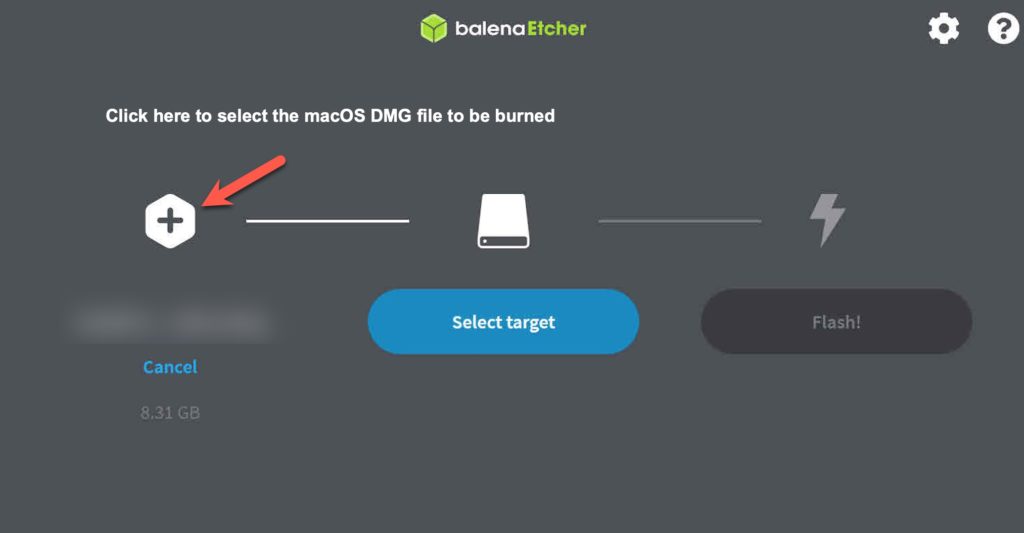
First of all, download the macOS DMG file as discussed above. Now get BalenaEtcher app for Windows. Click on the + icon to add the downloaded DMG image and choose a target USB disk, then press the Flash button to burn the disk following the on-screen instructions.
Can you please send me a link to the High Sierra download. I’ve been looking for thing everywhere.
Nice write u.
Please can I get the link to download the Mojave file?
Thank you
I install the virtual box 6.0.4 and i tired to install on it the mountain lion 10.8.3 .I have Mac OSX Mountain Lion DP4.DMG
i wait a lot time and finally a message appear “can’t download the additional components needed to install os x.”
can you help me Please …
sir lzzz give me mac mojave dmg link in my mail thank you sir
I have the Mojave.DMG and I am using a windows system. How do I create a bootable device for my husband to fix his macOS?
How to install macOs high sierra on HP desktop
Hi it is possible to get the download link to MAC os high sierra? My mac is not booting and I have to make an emergency start up disc. thanks
Hello may I have the link for MacOS DMG for burning bootable DVD. My iMac failed to boot because internal hard disk is dead. Had already tried internet boot and time machine recovery on external HD but no luck. Tried also “Install OS X Mountain Lion 10.8.5.dmg” from my friend to burn DVD but it is not bootable….. very frustrated…. please help!! Thanks in advance
Can I please have the download link to Mac OS High Sierra? Also, you may be interested to know that some of the Mac OS X versions are not universal binary compatible. Thanks!
mojave offline installer please…….version 10.14.1 if possible.
thanks
Hi I want to try the High Sierra and the Mojave OS.
Thanks
Please send me a download link to the High Sierra installer. My Mac’s harddrive is dead, and I only have a Windows
Hallo,
Bitte um High Sierra Link
Danke
Hi im looking for a copy of the full installer for High Sierra for a Clean install via recovery mode!
Thank you!
Hi would love to have High Sierra clean installer as DMG cuz I have to install it using external drive/flash drive.
Is it applicable to install it in a macbook pro early 2011 via reboot mode? Or do I have to install Lion and then update? Thanks!
Hi
I would like to get macOS Mojave 10.14 ISO 64 bits
Will it work if we dual-boot with windows ?
thanks
I need a .dmg file to make a bootable dual layer DVD of macOS High Sierra Installer.
Where can I find macOS high sierra bootable format??? if u have please send me a link to download.
I want to install that on my windows PC …..thanks
Very informative guide! I’ve got a hand me down Imac with an OS that i cannot get into. Tried command line password changing but that failed. Wanna do a fresh install. Please send the download link to High Sierra. Thanks a bunch!
Great guide!
Please send me a download link to the High Sierra installer. My Mac’s harddrive is dead, and I only have a Windows machine at my disposal
thank you my windows pc works for this to create bootable dvd or usb?
I’m 100% sure that it will work for you on macOS High Sierra. Only thing is you need to download the macOS in bootable DMG format.
i left rely request but do not see it. yes have dead mac trying to install with usb drive due to white screen issue as it cannot boot from hard drive
You want me to send a macOS DMG link? You may create a bootable USB or DVD with it and restore your machine.
Please send me Link to download macOS DMG as well. I deleted all of Partition. Thanks in advance. much appreciated.
you have saved my mac I bought a used replacement HD turns out it was used on a Windows machine now I need to make it usable on my Mac
Please send me a link and Thank You
Could I possibly have the download link for the High Sierra – Offline Installer?
Thanks in advance!
Awesome and easy to understand guide!
Hi, can you send me the download link to download the iso file to burn????
its for my mac book pro i just installed a new hardrive in it
I will send you the link to download macOS High Sierra in DMG format. Convert it to ISO using one of the methods given above.
version of High Sierra thanks
please can you send me link for to download mac os x lion to put in dvd
We don’t have one, unfortunately. However, It is easily available in the internet. Just search Google for Mac OS X Mountain Lion DMG. There is a site called “Get Into PC” which offers a download link.
Hi great guide guys
I’ve been trying everywhere to get the offline version of High Sierra ..could you please let me know the One drive address ? Thanks
SJ
We have sent the direct link to download macOS High Sierra DMG to your e-mail ID. Please check the spam folders if you coun’t find it.