
One of the features of the iPhone is the ability to display full-screen caller ID images for phone contacts, if the option is enabled in the settings. However, there are instances where, despite assigning a photo to a contact, the incoming or outgoing call from that contact shows the assigned photo as a small circle instead of the full-screen image. This appears as a thumbnail rather than the desired full-screen photo, as expected under these settings. In this post, we will explore methods to rectify this issue and ensure that contact photos are displayed in their full-screen size for incoming and outgoing calls when the same option is enabled.
Navigate to Settings > Phone on your iPhone, then choose “Incoming Call.” Select “Full Screen” from the two options that appear. This will enable full-size caller photo (set in the contact card ) and stop the iPhone from showing the incoming caller ID image as a tiny circle.
How to add a contact photo for caller ID on iPhone (iOS)
Before we address the issue of the caller’s photo not displaying on an iPhone, let’s first see how we can add a contact photo to an iPhone if you are hearing about this possibility for the first time. Assigning a picture to your contacts is easy and can be done through either the iPhone’s Contacts or the Photos app.
- Open the Contacts app > Tap on a contact > Click on the Edit link > Press on the “Album icon” or Camera > Use the iPhone Camera to take a photo or select one from the album > Done.
- Open the Photos app> Long press on a picture to choose it> Click on the share button> Scroll through the third tab (at the bottom) and find the “Assign to Contact” icon> Tap on it and Done.
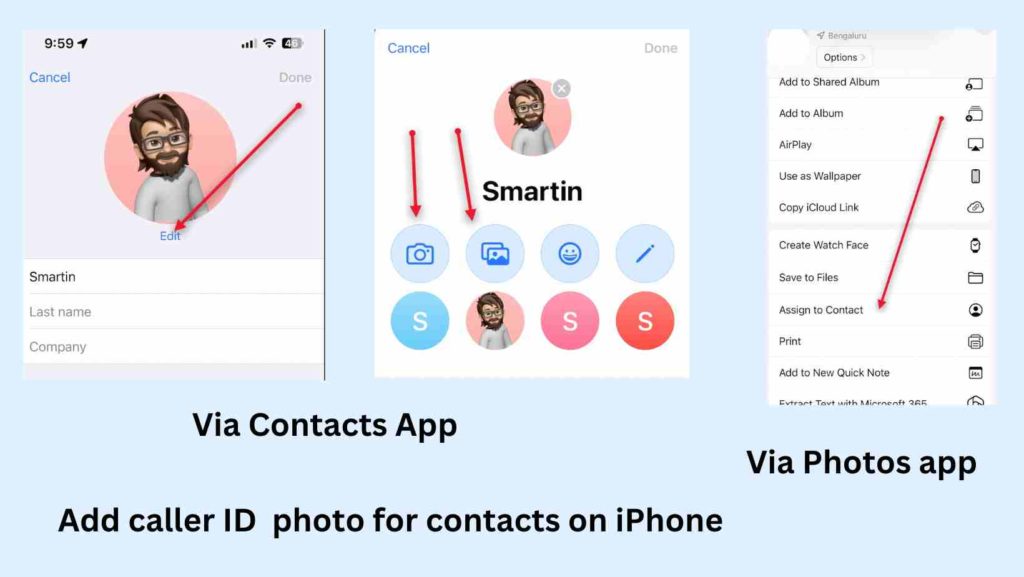
While these methods allow you to assign a picture to your contact on iOS 16, you may find it broken when the person calls you and the picture displays in a small circle rather than in full size- it looks like it is the default setting on the iPhone. Now, if you are trying to find a fix for this issue, there isn’t a definitive one we could suggest. The first method explained may work immediately and enable full-screen caller ID photos in less than 3 minutes. However, sometimes the iPhone may revert to the previous state, showing the contact’s picture only as a thumbnail inside a ring. In such cases, you can try the other solutions explained in the later sections of this page.
Get a full screen caller ID/contact photo on iPhone
As you can see below, on an iPhone, when a contact is assigned with a photo, the caller ID appears as a banner by default in iOS, not in full screen. However, you can easily modify this by going to Phone settings and selecting the option for a full-screen contact picture instead of a banner.
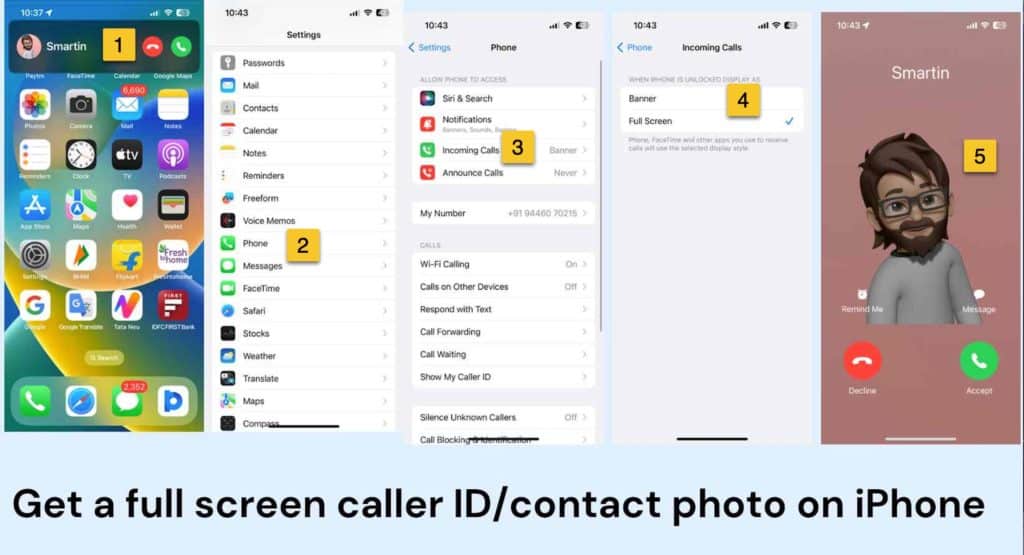
To do this, tap on “Incoming Call Settings,” where you’ll see two options: “Banner” and “Full Screen.” By default, “Banner” is auto-enabled, so the caller ID appears on a small screen. To change this, tap on “Full Screen.” The next time your contact calls you, you’ll see the caller ID image in full screen, as shown in the screenshot.
Enable full size caller photo for iPhone contacts
As I said earlier, occasionally iPhone displays a thumbnail image in caller screen, instead of the full-size photo we set in the Contacts app. The exact cause of this issue is unclear. If I share my experience, I had this problem with caller ID photos, after I did a restore for my iPhone from an old iCloud backup. It seems different versions of iOS and iPhone models handle it differently. Nevertheless, let me explain all I know to make your iPhone contact photos appear full screen on iOS 16.
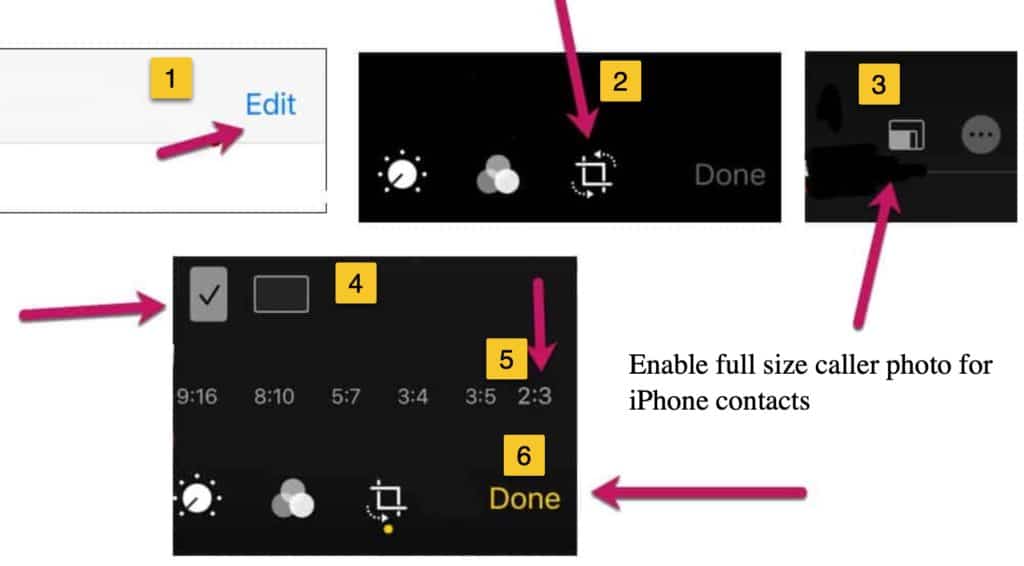
- First of all, open a required image from the iOS photos app and click on the Edit option.
- Choose to crop the image, and from the top-right section, click on the aspect ratio icon.
- Scroll through the ratio options, and choose 2:3, keeping the image in portrait mode.
- If you wish, make changes to the photo maintaining the settings, and press Done as you finish.
- Now, use the Contacts app in iPhone to set this image as the caller ID background.
The above method works in iOS 16, 15 and all other recent releases of iPhone software. However, if you have an older iPhone, try the following alternatives to activate full-screen caller images on iPhone.
Alternative fixes you can try to keep the iPhone contact pictures in full-screen size
I use the above methods to get full-screen incoming caller ID photo for my contacts on iPhone 13. However, there isn’t a permanent solution to this problem. All you can do is following a trial- and error approach. Check out a few more options based on my experience and suggestions from our readers.
- Take a screenshot of the photo in portrait mode and add it as the contact image, after cropping the Black corners.
- Turn-off data for iCloud sync, Phone, and Contacts: As you know, iPhone uploads contact images to iCloud. Later, if you don’t have that image in the gallery, they sync the thumbnail version of the photo from iCloud. Go to Settings> Mobile Data to disable data access. (not recommend)
- Use the photo taken with your iPhone camera for contacts. Pictures from the selfie camera are perfect for caller ID.
- Crop the caller ID image to have dimensions (or it’s multiples) of your iPhone display size.
- Use third-party apps like Sync.me for contact management and caller photo identification.
Keep your iPhone contact’s photos up-to date in full size with sync.me
In case you still not able to get full-screen caller ID on your device, another alternative is to use a third-party software from the App Store. One such software we use and recommend for our users is Sync.me. The app is the most reliable one for syncing photos, birthdays and other details of your contacts from social networks like Facebook.
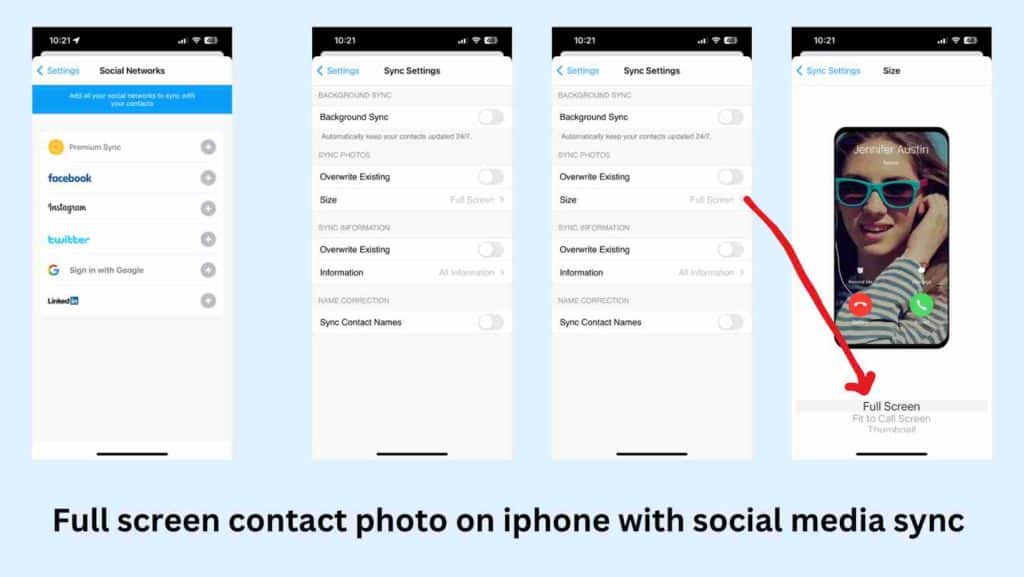
The advantage of the Sync.Me app is that you don’t need to edit all contacts to include pictures manually. Sync.me connects to your social profile on Facebook, Instagram, Google or Twitter to download and import latest profile photos of your contacts if their number is saved on your iPhone. And you also get the option to choose whether your contact photos fit in full screen, phone screen or as a thumbnail.
This app requires you provide full consent to upload your contact list to Sync.Me servers for their Facebook sync to work. They use it to provide live caller identification service, just like TrueCaller app.
Steps to activate full screen contact photos in iPhone with Sync.Me.
- Download and Install the Sync.Me app, here.
- Accept the permission to access contact information.
- Press on the Get Started to button to begin.
- Verify your mobile number with Sync.Me through OTP.
- Touch the Sync button, which opens the option to sync from social networking apps like Facebook, Instagram, and Twitter.
- Click on the + icon and follow the instructions on Sync.Me UI to link your social profile to the app.
- Now, open the Sync Settings from the menu. Here, choose Full Screen as the size choice under Sync Photos option. Also, choose what all information you want to sync.
- The app prompts a message to start syncing as you complete the Sync Settings option. Agree to “Sync Now.” and start with the import process.
- In the next step, you may filter out conflicts and manually choose which all contacts you would like to include in the Sync. The selected contacts get full-screen photo caller IDs.
- See the last part of the video to see the app working on iPhone.
One potential drawback of using Sync.me is the need to upload your contact numbers, which may raise privacy concerns for some users. However, the app offers an option to delete your account from their platform and reset all data, giving users a choice and control over their privacy settings.
Probable reason for iPhone losing contact photo sizes after iCloud restore or Sync
According to Apple website, the maximum size of the vCard image for an iCloud contact is 224 KB. It looks like Apple is using compression techniques for maintaining the size of the contact images uploading to iCloud.com. And probably that is the cause for low quality and small-size contact photos when you prefer iCloud restore for your device. Since this iCloud setting is ON, all the additional pictures you add also come as thumbnails no matter what you do. Share your thoughts in the comments.
Rose says
I had issues with thumbnail only and on banner. When I changed incoming calls – settings, phone, incoming calls to full screen it came up fine (after a half a day of trying!!) Hope it works for all of you
Jeeva says
How to set iPhone caller photo full screen without copying it?
Bishay says
Wonderful. Thanks!
iTomas says
Hi, how I can set incoming call as a baner on locked screen? I do not want fullsize photo of person who is calling me when I have my phone somewhere on table. I want just baner with small photo in ring
iphone SE2
Please how I can set it up
Thanks
Bruno Sargento says
I found a solution for iOS 13
Crop the photo to 2:3 size and add the to contact.
the photo size can be reverted to the original after the contact syncronization.
Me says
Epic fail!!! This did not help at all.
Akki says
This one works only for calling iphone to iphone, it won’t work to call from android to iphone
Malaika says
Please try sync.me it works!! You can edit the contact but save it in full screen by taking a screenshot however you want it to look on screen.
My mom was having trouble with the full screen finally solved !!
Himanshu says
I found the fix after tying many methods – just turn off mobile data for contacts and phone app. Delete and add photo again for the contacts.
Nico says
That worked for me:-)
Naveen Sankar says
Dude you are a life saver. That was the only answer that worked after hours of debugging.
EMOZ says
I almost tried everything read every article in this issue it just doesn’t work Surprisingly it works for few seconds in xs after editing or assigning a photo. After a while that contact page acts as if it refreshed itself and then it again gives me a thumbnail.
It’s very disappointing!
Polik says
Dude we have the same issue and it’s annoying AF!!
Kapil Maru says
i have the same issue
Kapil Maru says
Now it is working fine – restart the phone after below process
Just turn off mobile data and delete photo and add again photo from the contact edit option
Sreekanthan S says
Hello! I tried all the methods and nothing worked. I was seriously hoping that either or the method would be working. Disappointed to say that. I am currently having iOS 13. Please help me with Full screen photo caller ID.
Malaika says
Try sync.me it works just solved the issue on iOS 13
Amruth T.N says
Hello All
I have used many of the tricks and solutions described above but none of them worked for me in long time.
The trick I used and worked in all cases is really simple. Crop the Photo that you would like to keep it is as Contact Photo.
1. Select the Photo you would like to save it as contact Photo.
2. Select the option “Duplicate” from context menu.
3. Edit the duplicated Photo and crop it any of these resolutions (975×1536 or 956×1521 or 959×1536 or 994×1529).
3.1. All the resolutions mentioned above are random. Basically you need to crop the image in a manner that the cropped Photo covers all the iPhone’s screen. Even the native Portrait Photos of iPhone are to be cropped to look like the occupy all the screen.
3.2. Photos taken in landscape mode are easy to crop. If you consider the full lands Cape Photo into three Parts (1/3; 2/3; 3/3). Any one Portion of the Photo is ideally sufficient to set as contact Photo.
4. Save the cropped Photo and save it as contact Photo.
5. Make a couple of calls to that contact to check if full screen Photo appears after saving.
Kei says
I cannot get full screen picture for some of my caller ?? And all the above does not work any other ideas?
Juan Escobar says
Hi guys
I don’t use Contacts from iCloud but Google Contacts instead. How can I set the fullscreen picture?
Jaime Pelota says
Thanks for your effort. Regardless of whether or not Apple has this situation planned out this way or not—this ultimately appears to be poor design that they must know exists and choose not to address as it doesn’t apparently concern them. It shouldn’t take tips tricks and special tactics to get this to work; in other words you should only just be able to choose a photo and update your contact and BAM—that photo is full screen each time that person is called. This should have been what Apple was trying to fix in the last iOS software version that came out on the iPhone 8.
Akash gupta says
I have use iphone 6 and dont show the full screen photo on contacts.
Kumaresh says
I tried sync.me app. It’s only showing full screen caller I’d from social network. If I edit the photo in contact thumbnail only showing……
Anushka Chauhan says
Hey..i got an iphone 8 plus…i tried all the above mentioned things…stopped syncing contacts from icloud..installed sync me…u cannot add fullscreen additional pic other then facebook dp of your contact…dunno what to do?🙄
WINYTIPS says
Just delete the DP you sync from Facebook and add a new one from the camera roll.
BarbCole says
I found the full screen only works with calls from iphone users or landlines. All my Android friends’ pictures do not show full screen.
Beverly Berthold Bethmann says
Not true my Android users do show full screen but I took the photos with my iPhone.That makes a tiny difference.